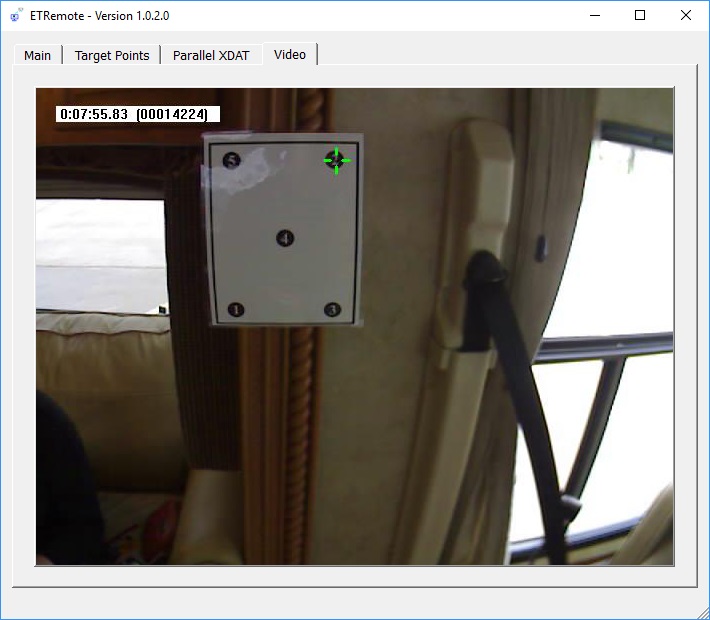
Access and control the eye tracker remotely over the network in real time. From a remote location, you can see what the participant is viewing, know where their attention is focused, and start recording whenever something interesting happens.
Receives and displays live digital data and streaming video from ETVision or an older ETServer system, over wired or wireless LAN.
Controls data recording on the tracker, streams stimulus video to it, and sends external data (XDAT) values for recording alongside gaze.
Records external-PC screen video in sync with the tracker's data files, which is how StimTrac is implemented.
Easily create, save, load, or run a script to present a series of images or videos as stimuli, while marking ETVision data with the start and end of each presentation event.
Use as a Stationary Scene Camera to stream an external PC display to ETVision.
One ETRemote can simultaneously control multiple eye trackers, while one ETVision can also communicate with multiple ETRemote screens for stimulus presentation.
A Network Communication manual describes communication with Argus Science systems over a local area network. Sample programs demonstrate communication from C++, MFC, C#, Python, LSL, MATLAB, and E-Prime, all with source code.
ETNetLib is a COM library providing the network interface: commands over TCP, streaming live data or video over TCP or UDP. Samples cover receiving live data and images, controlling recording, auto-calibration, reading AI object status, and setting XDAT values.
The manual and samples install with ETRemote, so your own programs can talk to the eye tracker the same way ETRemote does.
The protocol is open and documented. We will help you connect.
Talk to an engineer